Chrome DevTools for Lightstreamer

Debug Lightstreamer where it runs.

Lightstreamer Workbench brings Runtime Scope, chronological Evidence, and precise Context into one continuous workspace—then lets you reproduce COMMAND behavior locally without waiting for the backend.

Version 2.0 is live. Install the unified Scoped Evidence Workspace from the Chrome Web Store.

Lightstreamer Workbench
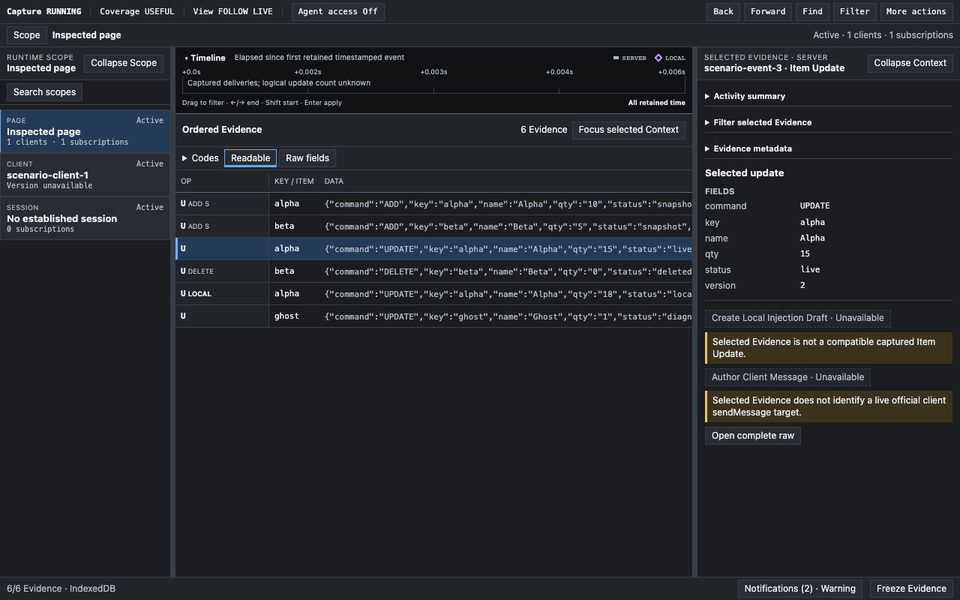
Lightstreamer Workbench showing Runtime Scope, Ordered Evidence, and selected Evidence Context in one DevTools workspace.

Official Web Client focusCaptures Lightstreamer semantics instead of guessing from generic WebSocket frames.

COMMAND-native evidenceFollows keys, operations, snapshots, and distinct state projections.

Local by designCaptured application data stays in the current browser debugging session.

Why Workbench

Streaming bugs rarely wait for a convenient sequence.

When a keyed row disappears, a snapshot looks incomplete, or application state diverges, browser logs are rarely enough. Workbench records Lightstreamer-native Evidence next to the inspected page, preserves the runtime object you are investigating, and makes the next deliberate action explicit.

It is developer infrastructure for applications using the official Lightstreamer Web Client—not a generic socket inspector and not an application-specific debugger.

One continuous investigation

Scope, Evidence, and Context stay together.

Version 2 replaces separate feature destinations with a responsive Scoped Evidence Workspace.

01

Choose Runtime Scope

Navigate Page → client → Session → Subscription → item → listener without losing retired historical objects.

02

Follow Ordered Evidence

Filter, find, select, and freeze a high-volume chronological stream while Capture continues.

03

Explain in Context

Inspect the active runtime object or selected Evidence without silently changing the investigation boundary.

Understand the unified workspace →

COMMAND without guesswork

Compare what the server showed with what local delivery changed.

Observed Server COMMAND State uses captured Server Updates only. Local Effective COMMAND State adds successfully delivered Local Injected Updates. Workbench names both projections and never presents either as authoritative server state.

Read the COMMAND projection guide →
Annotated Workbench COMMAND state walkthrough showing active keys, changed fields, and the Local Injection path.
Deliberate Local Injection

Reproduce one update without touching the server stream.

Create one protected Draft from immutable captured Evidence or author a COMMAND update against a live Scope. Edit raw JSON, validate, review the exact target, then deliver locally through the inspected page.

Local means local. This workflow does not contact the Lightstreamer Server and successful Local Evidence remains visibly separate from Server Evidence.

Follow the Local Injection workflow →
Protected Local Injection Draft with raw JSON editing, validation, and Source comparison.
Session-scoped by default

Keep the investigation useful without turning it into a data service.

Read the privacy policy →

What comes next

Deeper Evidence, not more disconnected destinations.

Next

Normalized JSON Evidence

A complete deterministic Evidence object per retained row, with the existing Context still providing semantic interpretation.

Next

Faster, more conclusive diagnosis

Contextual facets plus richer changed-field, delivery, provenance, recovery, and snapshot explanations.

Next

Client Messages and Server Injection

Capture outbound Client Messages and deliberately send through the inspected client's normal sendMessage path.

See Next and Exploring →

Lightstreamer Workbench mascot
Open source

Built in public for Lightstreamer developers.

The complete Workbench core remains available under Apache-2.0. Read the source, report an issue, or help sharpen generic Lightstreamer debugging infrastructure.

Ready when the stream is not

Bring the next Lightstreamer investigation into DevTools.